Auto Image Mapper
The Auto Image Mapper (AIM) enrichment detects where a target image appears within a scene video recording. It requires no setup or interaction other than a single user-uploaded reference image. It is robust to real-world variations in lighting, rotation, scale, and occlusions.
Setup
- Upload a Reference Image: Upload the image of the surface you want to track; scans and original 2D artwork (for example, printed material) work
- Run the enrichment
TIP
A good surface image is flat (not angled) and cropped to the edges that you want to track.
Validation
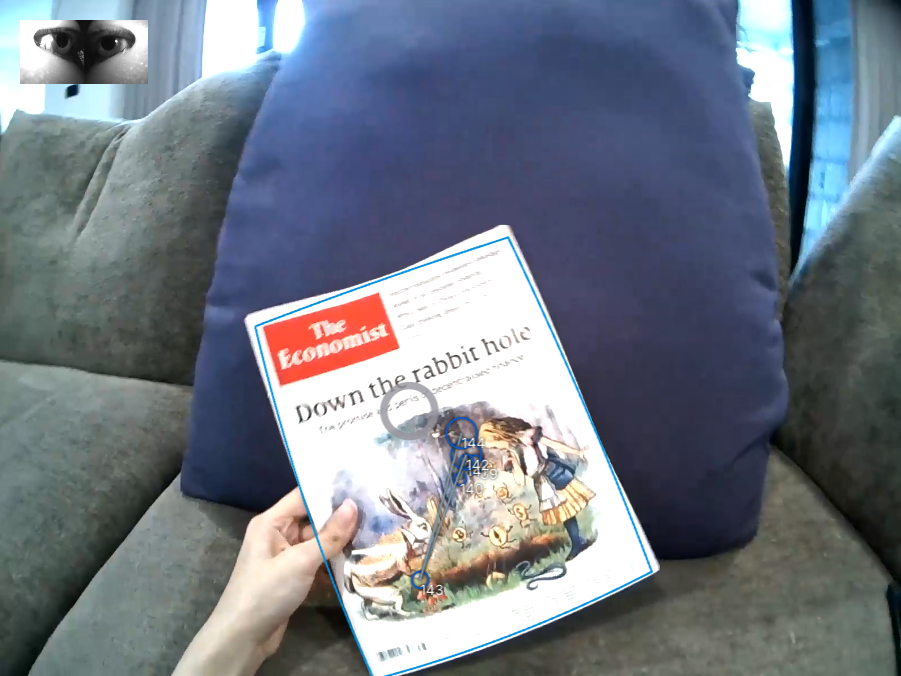
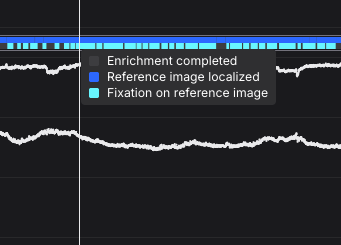
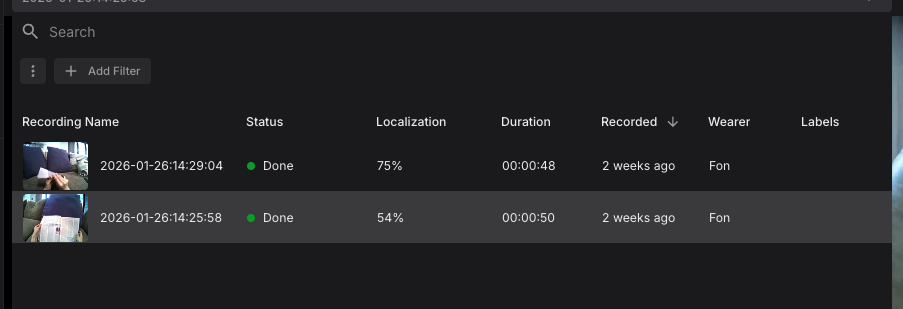
After the enrichment is successfully run, the recording will show a bounding box where the image has been localized within the scene video. The timeline contains visualizations that indicate when the image was detected and when fixations are on the detected image. You can also check how much of each recording is localized (in percentage) in the recording list dropdown.
TIP
If you find localization detection errors or fixations mis-mapped, then make use of the Mapping Correction tool or exclude sections with Events.
Export Format
gaze.csv
This file contains all the mapped gaze data from all sections.
| Field | Description |
|---|---|
| section id | Unique identifier of the corresponding section. |
| recording id | Unique identifier of the recording this sample belongs to. |
| timestamp [ns] | UTC timestamp in nanoseconds of the sample. Equal to the timestamp of the original gaze sample before mapping. |
| gaze detected in reference image | Boolean indicating whether the gaze point was detected inside or outside of the reference image. |
| gaze position in reference image x [px] | Float value representing the x-coordinate of the mapped gaze point in pixel coordinates. If the reference image was not detected in the scene at the given time this value is empty. |
| gaze position in reference image y [px] | Same as "gaze position in reference image x [px]" but for the y-coordinate. |
| fixation id | If this gaze sample belongs to a fixation event, this is the corresponding id of the fixation. Otherwise, this field is empty. |
| blink id | If this gaze samples belongs to a blink event, this is the corresponding id of the blink. Otherwise this field is empty. |
INFO
This CSV file only contains data-points where the reference image has been localised in the scene. Looking for all the gaze points? Check this file.
fixations.csv
This file contains fixation events detected in the gaze data stream and mapped to the reference image.
| Field | Description |
|---|---|
| section id | Unique identifier of the corresponding section. |
| recording id | Unique identifier of the recording this sample belongs to. |
| fixation id | Identifier of fixation within the section. The id corresponds to the fixation id of the raw unmapped data. |
| start timestamp [ns] | UTC timestamp in nanoseconds of the start of the fixation. |
| end timestamp [ns] | UTC timestamp in nanoseconds of the end of the fixation. |
| duration [ms] | Duration of the fixation in milliseconds. |
| fixation detected in reference image | Boolean indicating whether the fixation was inside or outside of the reference image. |
| fixation x [px] | Float value representing the x-coordinate of the fixation in reference image coordinates. This position is the average of all mapped gaze samples within the fixation. |
| fixation y [px] | Same as "fixation x [px]" but for the y-coordinate. |
sections.csv
The enrichment is calculated based on sections defined by a start and end event. The sections.csv file contains the start and end timestamps of all sections that were used for the enrichment calculation, along with the corresponding section and recording IDs.
Reference Image
The reference image that was used for defining the enrichment. The file is named reference_image.jpeg|png.
AOI Metrics
If AOIs are defined for the enrichment, the download would also contain the AOI metrics in .csv format, as reported in the AOI Metrics.